
Trump Accounts: Official App
Department of the TreasuryFinance
4.8771.00 Reviews
- Version
- 2026.43.1
- Installs
- 1.00M
- Age Rating
- Everyone
Screenshots

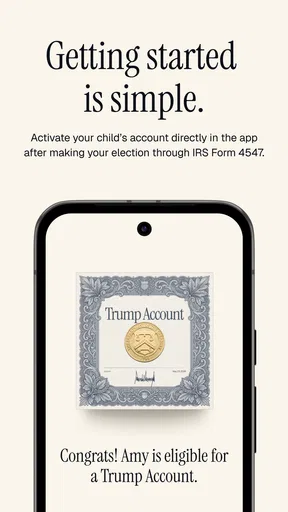
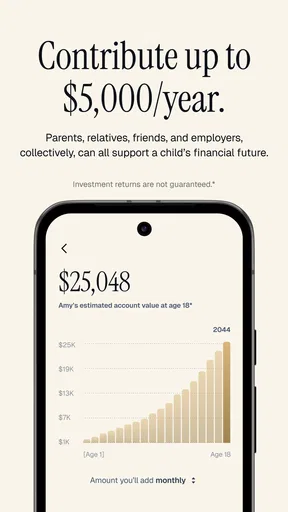

Our Review of Trump Accounts: Official App
 Analysis by Appyee
Managing a child-focused financial account often sounds simple until the practical questions begin: where do I start, how much information must I enter, will the process feel clear on a phone, and can I return later without losing track of what I was doing? Trump Accounts: Official App is built around that first step toward saving for a child’s future. It is a free finance app from the Department of the Treasury, and its purpose is much narrower than a general banking or investing app. That narrow focus is both its biggest strength and the main reason some people may find it unsuitable.
I approached it as a parent would: not looking for a full personal-finance dashboard, but trying to understand whether the app makes a government-backed child-savings task easier to handle from a mobile device. The experience feels most useful when you already know why you are opening it. It is less convincing as a place to explore broad financial options, compare products, or manage everyday spending. This is a focused starting point, not a replacement for your regular banking app.
What the app is designed to do
The store summary, “Invest in your child’s future,” gives the right general impression, while the short description, “Trump Accounts,” makes the app’s identity unmistakable. The developer is the Department of the Treasury, so the app presents itself as an official route for handling this specific account subject rather than as a private budgeting tool or a commercial investment platform.
That distinction matters. A typical finance app may combine checking accounts, card controls, spending charts, transfers, bill payments, and investment portfolios. This one is better understood as a dedicated doorway. If your immediate goal is to learn about or work with a Trump Account for a child, keeping the process in one purpose-built app can feel more orderly than searching through unrelated financial menus.
In everyday use, I would open it when I had a particular task in mind: checking the account process, reviewing information connected with a child, or returning to continue an application-related step. I would not expect it to replace the app I use for groceries, rent, direct deposits, or monthly budgeting. That separation is healthy, because mixing household spending with a child’s long-term account can make the purpose of the money less clear.
Who will get the most from it
The strongest audience is a parent or guardian who wants a dedicated mobile place for a child-related Treasury account and prefers an official source over a third-party explanation. It may also suit relatives who are helping a family understand the account, although the person responsible for the child’s financial details should remain the one handling sensitive steps.
It is also a reasonable fit for people who dislike financial apps overloaded with promotions and unrelated products. The focused subject should make it easier to concentrate on the account rather than get distracted by credit offers, trading ideas, or spending rewards. For a first-time user, that can reduce decision fatigue.
On the other hand, I would skip it if you are looking for a complete investment education platform, detailed portfolio analysis, or a single app for all family finances. A general banking or brokerage service will normally be more suitable for those jobs. The app’s value comes from its official, specialized role, not from trying to do everything.
A realistic family scenario
Imagine a parent sitting down after dinner with a child’s identifying information nearby and a few questions written on paper. Instead of opening a general bank app and searching for an unfamiliar section, the parent launches this app specifically to work through the Trump Account topic. The useful workflow is to prepare first, enter information carefully, stop if a detail needs checking, and return later rather than rushing through a financial form.
That last point is easy to underestimate. A mobile screen encourages quick tapping, but child-related financial information deserves a slower rhythm. I would keep the child’s details, the responsible adult’s information, and any questions about the account separate from unrelated notes. If the app presents a confirmation step, I would read it twice before submitting. The app can make access more convenient, but it cannot make careless data entry harmless.
Speed, stability, and everyday handling
I look at speed and stability here through the lens of a sensitive account task: the useful test is whether I can pause, return, and understand what has happened without rushing or repeating an action. For everyday handling, I would build in a moment to check the current account status after any interruption. That practical habit leads naturally to the next question: how much confidence should I place in the app when personal information is involved?
What speed should feel like
For this kind of app, perceived speed is less about rapid scrolling and more about whether the next useful screen appears without making me wonder if a tap registered. A focused finance app should feel calm: clear transitions, readable forms, and enough feedback after an action. When I am dealing with a child’s financial account, I prefer that kind of measured experience over flashy movement or aggressive shortcuts.
The current version is 2026.34.0, and the app has reached an average rating of 4.8 from around 3.1 thousand ratings. Those figures suggest that many users have found the overall experience satisfactory, but they should not be treated as a guarantee that every device or connection will behave identically. A high rating can tell me that the app is broadly well received; it cannot remove the need to verify important submissions.
The best way to judge its speed is during ordinary actions rather than during a long session. Open the app, move through the relevant account information, pause before a sensitive confirmation, and see whether the interface remains understandable when you return to it. If a page appears slow, avoid repeated taps. In financial software, duplicate submissions caused by impatience are more concerning than a brief delay.
Moments when the app may feel heavier
The demanding moments are likely to be information-heavy rather than entertainment-heavy. A user may need to read explanations, review personal details, check a child’s information, and move through several account-related steps. That can feel mentally heavier even if the app itself is not doing anything visually complex.
I would approach those sessions with a stable connection and enough time to finish a step properly. Switching repeatedly between the app, messages, notes, and a browser can make it harder to remember which screen was complete and which was still pending. A better workflow is to gather what you need first, use the app in one focused session, and take a screenshot or note only when doing so does not expose sensitive information unnecessarily.
Another practical trade-off is that a narrow app may be quicker for its one subject but less convenient when you need context from elsewhere. If you want to compare a child’s account with a household budget, you will probably move between apps. That is not a performance failure; it is a consequence of specialization. I would rather have a focused account tool than a crowded finance app that hides the relevant action among unrelated features.
Reliability and recovering from interruptions
Reliability matters more here than visual polish. A user needs confidence that the app will preserve a clear state when a phone call arrives, the screen locks, or the person pauses to find a document. The most sensible habit is to treat every completed screen as a checkpoint: read the confirmation, note what has been accepted, and avoid assuming that returning to the app means a submission went through.
If an interruption occurs, I would reopen the app and look for the account’s current status before entering the same information again. That is a small but important recovery rule. Repeating a form from memory can create inconsistencies, while checking the current state first reduces the chance of duplicated work or conflicting details.
The app has more than 500 thousand installs, which gives it a meaningful user base for an official finance tool. I see that as reassuring in terms of adoption, but not as proof that every individual interaction will be flawless. A reliable personal workflow still includes careful review, patience during loading, and keeping any confirmation information in a secure place.
For people who frequently lose connectivity, the app may be less convenient than a paper checklist or a desktop session that can remain open beside their documents. I would not begin an important account step while moving between weak signals or when the phone battery is nearly empty. The app is designed for mobile access, but mobile convenience also brings interruptions that are less common at a desk.
Device limits and resource expectations
The minimum operating-system requirement is Android 7.0, which makes the app accessible to a wide range of Android devices. That does not mean every older phone will feel equally comfortable. A phone with limited storage, an aging battery, or a crowded background workload may take longer to open finance apps, reload screens, or switch back after an interruption.
For a short, task-based finance app, I would expect resource demands to be more manageable than those of a video editor, modern game, or constantly updating social platform. Still, I would keep the operating system updated when possible, close unnecessary apps before beginning a sensitive session, and install the latest available app version rather than relying on an old build. These steps are especially useful when the task involves several screens and a secure sign-in process.
The Everyone age rating also makes the app broadly approachable from a store-classification perspective, but that should not be confused with a child independently managing financial information. The account concerns a child’s future, while the responsible adult should make the decisions and protect the information. I would keep the phone locked and avoid handing it to a child simply because the app carries an Everyone rating.
Where it differs from usual finance alternatives
Compared with a standard bank app, Trump Accounts: Official App should appeal to users who want a direct, specialized destination instead of a broad financial dashboard. A bank app is usually better for checking balances across everyday accounts, moving money, paying bills, and reviewing transactions. This app is better when the question is specifically connected to a Trump Account and you want the official source at the center of the process.
Compared with an investment app, it is likely to be a better fit for someone who wants to avoid trading screens, market-watch lists, and a large menu of financial products. An investment platform may offer more tools for an experienced investor, but that extra choice can be unnecessary or confusing when the immediate goal is simply to understand a child-focused account.
Compared with a web browser, the app offers a more dedicated entry point on Android. The trade-off is that a browser can be easier when you need several reference pages open at once, especially on a larger screen. I would choose the app for a focused mobile task and a browser or desktop for careful comparison and document review.
Small habits that make the experience better
- Prepare before opening the app. Keep the relevant child and guardian information organized, but do not leave sensitive details visible where other people can see them.
- Use one uninterrupted session for a major step when possible. Constantly switching apps makes it harder to distinguish saved information from information that still needs confirmation.
- After an interruption, check the current status before repeating anything. This is the safest way to recover from a locked screen, phone call, or uncertain loading moment.
- Use the dedicated app for the dedicated account, and keep household budgeting in your normal finance tool. Separating those jobs makes later reviews less confusing.
One less obvious advantage of this approach is psychological: a specialized account app can help a family keep long-term child savings mentally separate from short-term household money. That does not improve returns or change account rules, but it can improve the discipline of checking the right place for the right purpose. The limitation is that you will not get a complete picture of your finances in one glance.
Cost, access, and whether it is worth installing
The app is free, so the decision is mainly about usefulness, trust, and convenience rather than an upfront purchase. For a parent who needs to engage with Trump Accounts from an Android phone, that makes trying it straightforward. The free price also removes one common barrier for families who would not pay for a specialized financial utility.
Free does not mean effortless. You still need to understand what you are doing before confirming financial information, and you should not install it on a shared or poorly protected device without considering who can access the phone. I would also avoid treating the app as financial advice. Its role is to help with the account subject; decisions about saving, investing, and family priorities still require your own judgment.
Someone who only wants general information and never expects to use a Trump Account may not gain much from keeping it installed. In that case, a trusted general finance resource may be enough. The app earns its place when the specialized account is relevant now or likely to become relevant soon.
My performance verdict
Trump Accounts: Official App makes the most sense as a focused, official finance companion for a specific child-savings task. Its strongest qualities are its narrow purpose, free access, recognizable developer, and broad Android compatibility beginning with version 7.0. The adoption level, with over 500 thousand installs, and the 4.8 average rating also indicate that it has found an audience.
My reservation is not that it tries to do too little; it is that some users may expect a complete financial command center after seeing the word “Accounts.” If you want spending tools, broad investing controls, or a unified family balance sheet, choose a banking or investment app instead. If you want a dedicated place to approach a Trump Account carefully from your phone, this is the more logical choice.
I would recommend installing it for parents and guardians who value an official, task-specific route and are comfortable handling sensitive information slowly. I would skip it for anyone seeking everyday banking or advanced investment analysis. Used with realistic expectations, it feels less like another finance app competing for attention and more like a practical doorway for one important family financial job.
Privacy and Permissions
See what permissions an app requests and how it handles your data.
- Identity
- find accounts on the device
- Contacts
- find accounts on the device
- Location
- approximate location (network-based), precise location (GPS and network-based)
- Phone
- read phone status and identity
- Photos/Media/Files
- read the contents of your USB storage, modify or delete the contents of your USB storage
- Storage
- read the contents of your USB storage, modify or delete the contents of your USB storage
- Camera
- take pictures and videos
- Microphone
- record audio
- Wi-Fi connection information
- view Wi-Fi connections
- Device ID & call information
- read phone status and identity
- Other
- view network connections, change network connectivity, full network access, run at startup, control vibration, prevent device from sleeping, Google Play license check, read Google service configuration
Verdict
Strengths of Trump Accounts: Official App
- Official source for managing Trump Account enrollment and information.
- Clear explanations of eligibility, contributions, and account rules.
- Useful updates help families follow changes to the program.
- Designed to simplify access to government account services.
- Provides links to relevant federal resources and support channels.
Limitations of Trump Accounts: Official App
- Availability may depend on eligibility and current program rollout.
- Some features may redirect users to external government websites.
- Account setup can require personal and financial information.
- Information may change as regulations and program details evolve.
- Support options may be limited outside standard government service hours.
Similar Picks in This Category
View All
Google Wallet
Google LLC4.3

Airtel: Recharge, Bank & Loans
Airtel4.0

PayPal - Pay, Send, Save
PayPal Mobile4.2

DANA Indonesia Digital Wallet
PT Espay Debit Indonesia Koe4.5

Binance: Buy Bitcoin & Crypto
Binance Inc.4.8

Cash App
Block, Inc.4.7
Frequently Asked Questions
What is the Trump Accounts: Official App used for?
Trump Accounts: Official App is designed to help eligible families learn about and manage information related to Trump Accounts, including program details, enrollment guidance, contribution rules, and account status where available. Before downloading, users should understand that the app may provide access to official information and services, but eligibility, account availability, and supported features can depend on current government rules and the user’s personal circumstances.
Who can use Trump Accounts: Official App?
The app is intended for people who need information about Trump Accounts, such as eligible parents, guardians, beneficiaries, and other authorized users. Access to specific account features may require identity verification and may be limited by age, residency, tax status, or other program requirements. Review the official eligibility criteria carefully, and make sure the application is published by the legitimate official source before entering personal information.
Is Trump Accounts: Official App free to download and use?
The official app may be available to download without an upfront charge, although mobile data costs could apply depending on your internet plan. Some services connected with account administration may also involve separate rules or requirements, so users should read the terms and fee information shown inside the app. Avoid unofficial versions that request payment simply to install or unlock basic government program information.
What personal information does the app require?
Depending on the features you use, Trump Accounts: Official App may request information needed to verify your identity, confirm eligibility, review account details, or submit enrollment-related information. This could include contact, tax, beneficiary, or identification details. Before continuing, check the app’s privacy policy, permissions, and security notices. Only provide sensitive data through the verified official application and a secure internet connection.
Can I manage contributions or withdraw money through the app?
The app’s available account-management functions may vary according to the current program rollout, user role, and account status. It may provide instructions or status information rather than support every transaction directly. Contributions, investment options, withdrawals, tax treatment, and restrictions are governed by official rules and may change. Read the latest guidance in the app and consult an authorized financial or government representative before making decisions.
